
Invoice, credit note and advance invoice
For companies or private customers. Numbering series, references and payment deadlines.
An e-invoice solution for small businesses in Latvia
For small businesses and self-employed people. Prepare XML and PDF, check incoming invoices and keep everything in an organised archive. In a browser on your phone or computer.
Free: 3 new bills and 3 PDF exports each month. Incoming XML and previews are unlimited.
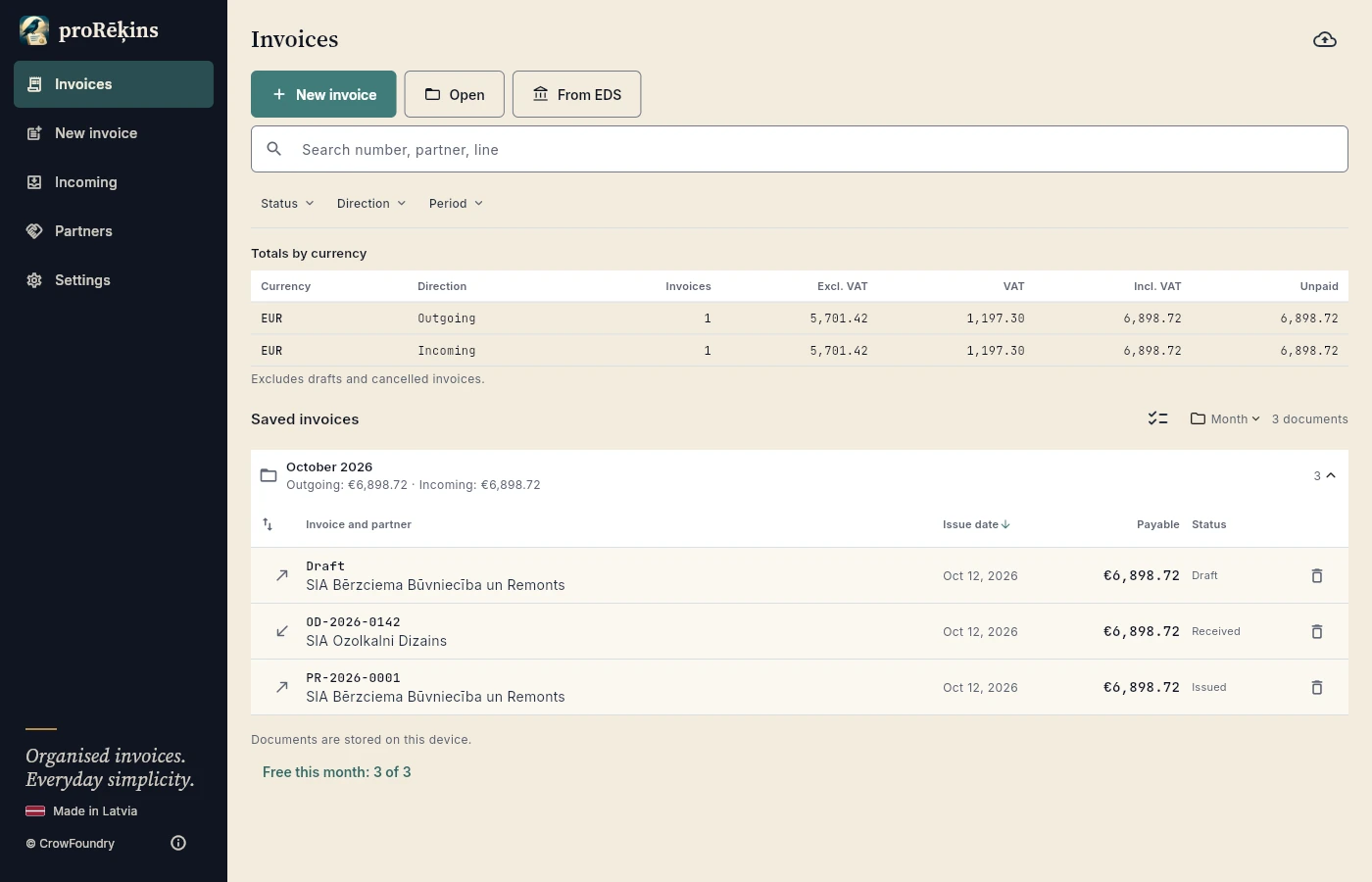
Real app screens. All examples use fictional data.
We do not store them on external servers. Sharing and sending to VID take place only with your confirmation. How data is processed →
Real work. Real screens.
Company details, goods or services, VAT and payment terms in one clear workspace.
Change the template, colour and typeface and see the PDF immediately. Restyling leaves the structured invoice data unchanged.
Compact invoice lists, groups and search. See payment statuses and totals, then open the facts or files you need.
Read parties, line items, totals and checks in plain language. Keep the original XML and preview a PDF even on Free.
All companies, accounts and transactions in the examples are fictional; register results are illustrative. Real app captures in phone and large-screen layouts.
From everyday work to e-invoices
Issue and receive. Find and check. Save and share. Less retyping, a clearer view of every document.
For companies or private customers. Numbering series, references and payment deadlines.
Different VAT rates and categories, discounts, charges and readable totals.
Live preview, templates, colours, fonts and your logo. Restyle an archived invoice, too.
Open the original XML, read organised facts and see what was found and what needs checking.
Search, compact filters, collapsible groups, currency totals and payment statuses.
Original XML and PDF files. Save on your device or share through an app you choose.
Every invoice has two sides
Structured data and a clear layout come from one invoice. Choose a template, colours and typeface in the live preview. Add your logo after saving it in the issuer profile.
Incoming e-invoices
Open an incoming file and read company details, line items, totals and notes in an organised view. Checks explain what is present and what needs attention. The original XML remains unchanged.
Help that keeps you in control
proRēķins helps prepare and process data. You verify the transaction, taxes, recipient and whether submission is required. The app does not replace an accountant.
Choose an issuer and partner, enter line items and review calculations. Drafts and previews do not use the new-bill allowance.
Review XML checks and the PDF. Optionally check register and VAT data. Resolve discrepancies before issuing.
Issue, save or share files. Confirm a VID action separately and check its result. Prepare a selected batch for your accountant.
Simple plans. Clear allowances.
Latvia prices include VAT. Monthly allowances reset each calendar month in Latvian time, even when you pay annually.
For getting started and light use.
€0free
No payment or subscription
For regular small-business work.
€3/ month
Or €29.99 / year
For higher volume and extra checks.
€10/ month
Or €99.99 / year
A new bill counts once when its issued number is assigned. Invoices, credit notes and advance invoices share one allowance. Drafts, received invoices and repeated XML exports do not use it.
Every successful PDF save or share counts: incoming or outgoing PDFs, re-exports, a new style and PDFs in a batch. Automatically saving a PDF in the app when issuing uses the PDF allowance; sharing it later counts again. Previews and cancelled saves are free.
Pro and Max allowances are shared by the account across devices. Pro issuing and paid PDF exports need internet. Max issuing can use a valid offline licence. Free limits are local. Subscription terms.
Enter total PDF saves and shares, including PDFs automatically saved in the app. This estimate helps choose a plan; it makes no purchase and changes no account.
For your workload
Up to 20 new bills, 20 PDFs and 10 EDS imports per month.
3,00 € / mēnesī
VAT included. This is an estimate, not a checkout offer. Confirm the exact price and billing period at checkout.
What counts towards an allowance? →AI that works with your app
Optional integration in the open browser tab lets an assistant find invoices, prepare drafts, calculate, validate and show previews. Issuing, deleting, delivering files and VID actions require your confirmation.
How to connect an AI assistant →Example with fictional data
“Prepare a draft invoice for SIA Lazdu Dārzs for 10 hours of consulting. Show the total and a PDF preview.”
Before you begin
Yes. Add your company or business details and the applicable VAT status. Issue invoices to companies or private customers. You verify the tax treatment and e-invoice obligation; Free includes 3 new bills and 3 PDF exports each month.
A structured e-invoice is machine-readable XML. PDF is the convenient human-readable version. proRēķins helps prepare both; you choose the appropriate delivery and VID reporting method.
No. VID submission and delivery to the buyer are separate actions. Send the buyer the XML through an appropriate channel. Use your own access for VID EDS, confirm the operation and check its result.
For transactions between Latvia-registered businesses, the general obligation is scheduled from 1 January 2028, subject to legal exceptions; B2B e-invoice reporting to VID is scheduled from the same date. Public-sector requirements apply from 2025 with transitional rules, and VID reporting from 2026. Foreign and private-customer transactions require separate assessment. VID guidance · Accounting Law.
3 new bills and 3 successful PDF exports per month on the particular device. Incoming XML opening, validation, archiving, XML export and PDF previews are unlimited.
No. Your subscription and paid allowances belong to your account, but the invoice archive stays on each device or browser. Transfer data with a backup.
Transaction descriptions, prices and customer details are your business information. proRēķins calculates, checks XML and typesets PDFs locally on your device or in your browser, without creating an invoice archive on our servers. CORE receives account, subscription, allowance and bounded technical data, rather than an automatic copy of invoice files. This helps your business control who receives its documents.
Local processing and storage are the default. You choose export, sharing, an accountant batch or VID submission. In a confirmed browser VID operation, XML and access data are transiently forwarded through a protected CrowFoundry relay to the official VID API; no invoice cloud archive is created. An AI client you approve can also send data to its external service. Review the recipient and selected content before delivery.
Choose Open on the home screen and select the XML file, or use Open with / sharing to proRēķins on a supported device. Review parties, line items, totals and checks, then keep it in the local archive. Optionally use received EDS imports with Pro or Max. The original XML remains unchanged.
Use the save or share icon in an invoice’s PDF and Files views. Choose a file and destination: disk, message, email or another supported app. Browser sharing depends on the browser; download lets you send the file manually as well. XML exports and previews are unlimited. Each successful PDF save or share uses Free’s 3 / Pro’s 20 monthly allowance; Max volume is unlimited.
Share the required XML and PDF with your accountant, or select a batch for Jumis, Zalktis or Visma Horizon file export with Pro / Max. Verify account mappings and import in that system. To change device, create a .prorekins backup and open it on the other device, choosing merge or a confirmed replacement. Exported PDFs included in the file use the PDF allowance. A subscription belongs to the account, but signing in does not itself transfer the archive.
They help return to an earlier local database and invoice-file snapshot, but remain on the same device or browser. Automatic backup is on by default and can be disabled in Settings. Restoration needs confirmation; used allowances and reliably stored numbering history are not rolled back. These internal local copies are not PDF exports. Device loss or browser-storage deletion requires a backup kept outside the app as well.
Ending private browsing, clearing site data, changing browser profile or device, and storage eviction. Local browser storage is not a server backup. Regularly create an external backup, keep important XML files and verify that the backup opens before clearing data or changing device.
Drafts, previews and the local archive work offline after the app has loaded. Free bill and PDF allowances are local. Pro issuing and all paid PDF exports need an online allowance check. Lookups, EDS and sign-in use internet.
The app makes no bank payment. VID connection is optional, uses your EDS API access and requires separate confirmation and result checking. An AI assistant cannot accept your legal declarations or pay for a subscription.
The app uses a SEPA payment QR format. Support differs between banking apps, so it cannot be guaranteed for every bank. QR is optional; the IBAN, amount and payment reference remain readable.
In the web edition, payments are processed by Stripe. The subscription belongs to your account. Confirm the final price, billing period and renewal at checkout.